

How to Access SAHM Portal and Restricted Pages

Some pages, resources, and features on the SAHM website are accessible only to member or non-member users who are logged in. This includes certain registration forms, members only restricted content, and personalized tools. 

If you have any questions or need further assistance, please contact SAHM Member Services at info@adolescenthealth.org.

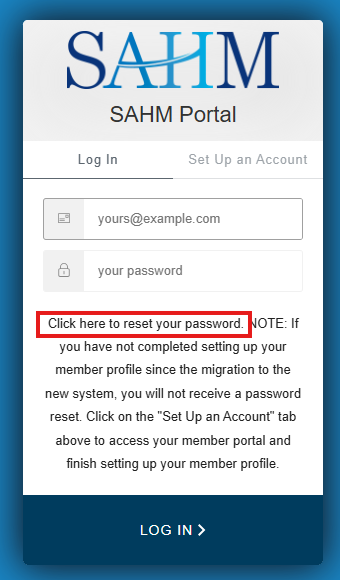
Have an Account and Need to Reset Your Password?

When prompted to log in, the screen on the right will appear. If you have forgotten your password, you can use the “Forgot Password” link (highlighted in yellow) to quickly reset it.

How to Create an Account

Creating a non-member login account is free and does not require paid membership.  Please note, that some pages and features are restricted to current SAHM members. Learn more about the benefits of being a SAHM Member.

    1. Go to: https://portal.adolescenthealth.org
    2. Create Your Free Account: If you do not have an account, select “Set-Up Account” and enter the following information:
      • Your First Name
      • Your Last Name
      • Your Email Address
      • Your new password

Follow the prompts to set up your profile and establish a login/password.

Access Denied Message

If you encounter an “Access Denied” message on a page you believe you should have access to, please log out and log back in via the SAHM website login page: https://adolescenthealth.org/wp-login.php?action=logout. This refreshes your permissions and ensures proper access.  Please note, that some pages and features are restricted to current SAHM members. Learn more about the benefits of being a SAHM Member.

Scroll to Top